QA the system, not just the agent.
Every other AutoQA tool scores one side of the conversation: the agent. But customers do not talk to agents, they talk to your business. ResolveLoop evaluates the whole conversation, then tells you whether a poor outcome was caused by the agent, the product, the policy, or a process gap. Then it names the actual problem, so when you fix something, you fix the right thing.
THE PROBLEM
QA looks at your team. Nothing looks at what your customers keep running into.
This is not an oversight — QA was built to grade the one thing support could change: the agent. Meanwhile, the missing feature, the policy customers won't accept or the broken handoff is someone else's department, so it never made the scorecard.
That half lives somewhere else, if it lives anywhere. Maybe it's a monthly report built on your team's own tags, which nobody quite trusts. Maybe it's a VoC tool that costs a fortune. Or maybe it's a separate CX team with its own surveys and its own conclusions.
And every one of these only sees the conversation. None of them know what your product actually does or what your policies actually say — so whatever the agent said becomes the record.
Either way, your customer had one experience — and you're piecing it together across three tools, in a hand-stitched report about as actionable as a painting.
Agent QA
sees
how the agent handled it
can't see
whether the product could have solved it
Tagging or a VoC tool
sees
the tag someone picked
can't see
what actually went wrong
CSAT
sees
the customers who replied
can't see
everyone who didn't
Product · Policy · Process
no tool owns this
"One tool summarises the tickets, another does sentiment, and then I pull the CSAT export and feed it all into an AI myself. Half manual, half AI — every single month."
So you pull the one lever you have: coach the team. Even when the team wasn't the problem.
The Solution
One read of every ticket answers both: how well your team handled it, and what your customers keep hitting.
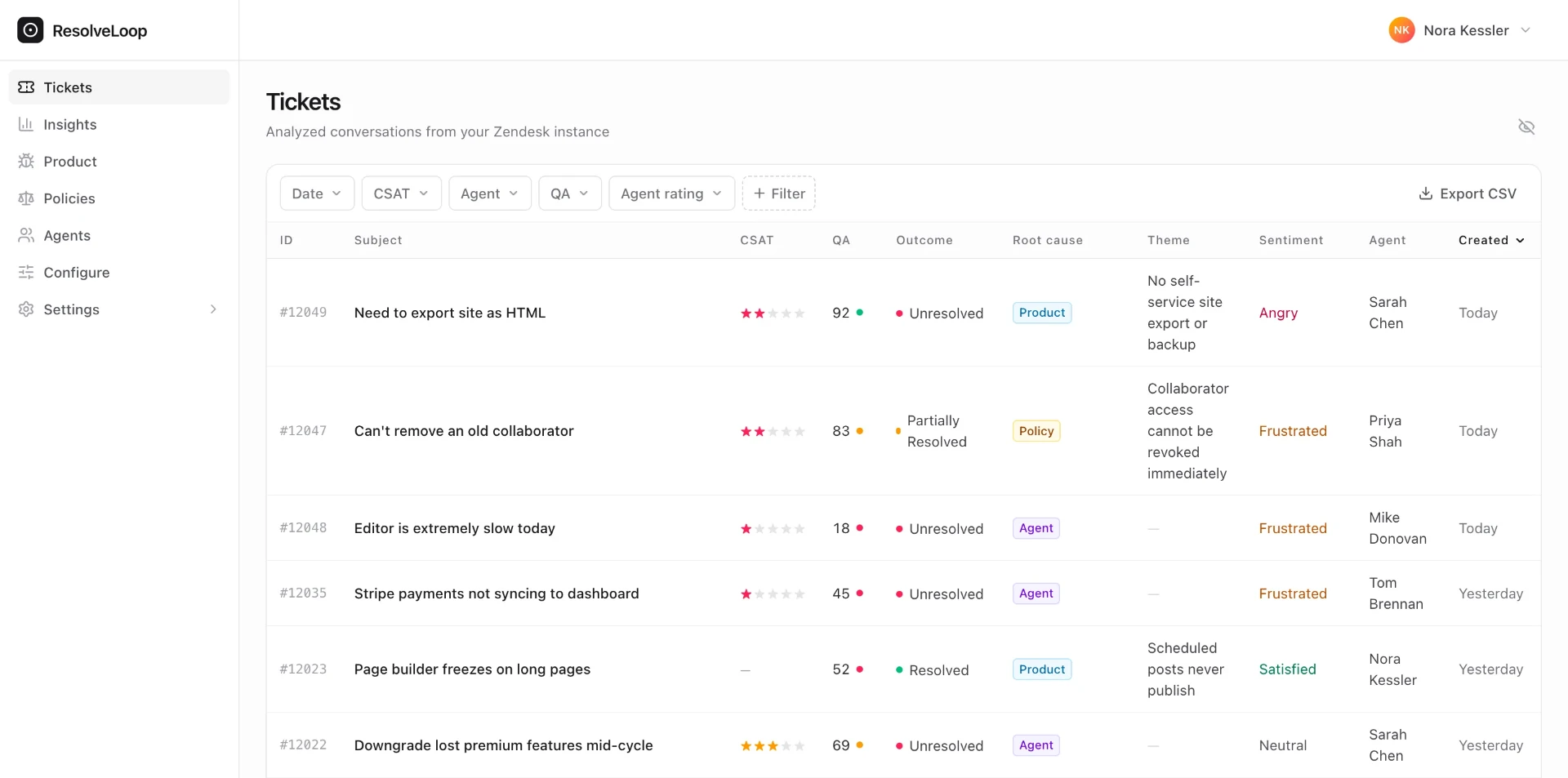
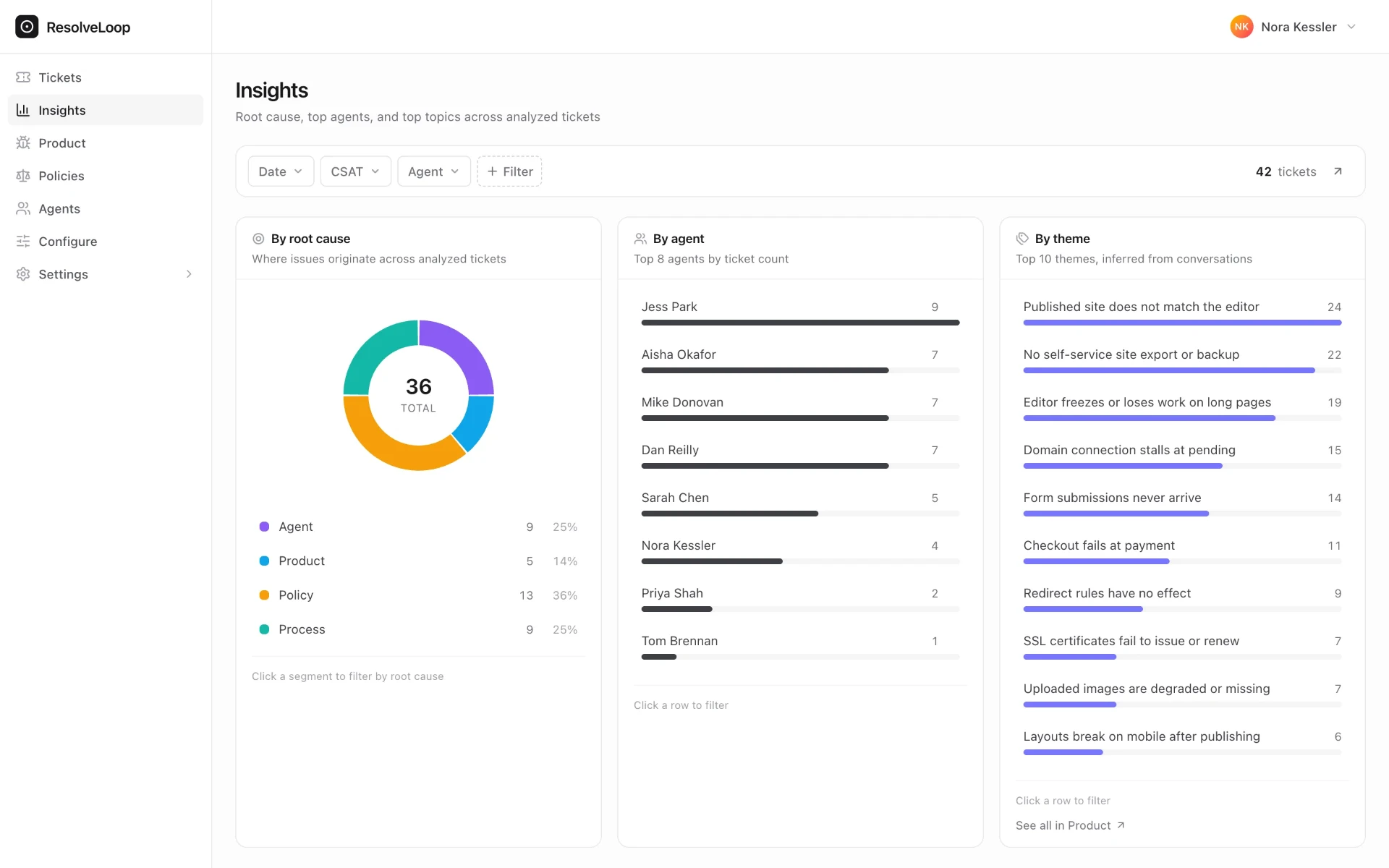
ResolveLoop reads every closed ticket and starts from the outcome: did this customer get what they needed? When the answer is no, it works out what stood in the way:
The first row is a full QA programme: every conversation reviewed against your own scorecard, criterion by criterion, on 100% of tickets — with the judgment kept fair, so a missing feature can't drag a good agent down.
The other three rows are the half that never made the scorecard. And ResolveLoop doesn't stop at the row — it names the actual problem. Not "a product thing," but No self-service site export or backup: 22 tickets, trending up, 82% unresolved. Not "a policy," but Annual plans fall outside the refund window, with the conversations right underneath.
Because both halves come from the same read, they finally connect. Good handling next to a bad outcome tells you the fix sits upstream of your team — and names it. Coaching becomes one lever on the board, not the only one you can reach.
Before it decides any of this, it checks the conversation against your own documentation and policies — so it isn't taking the agent's word for it.
The QA Side
Everything a QA programme needs. On every ticket, not a sample.
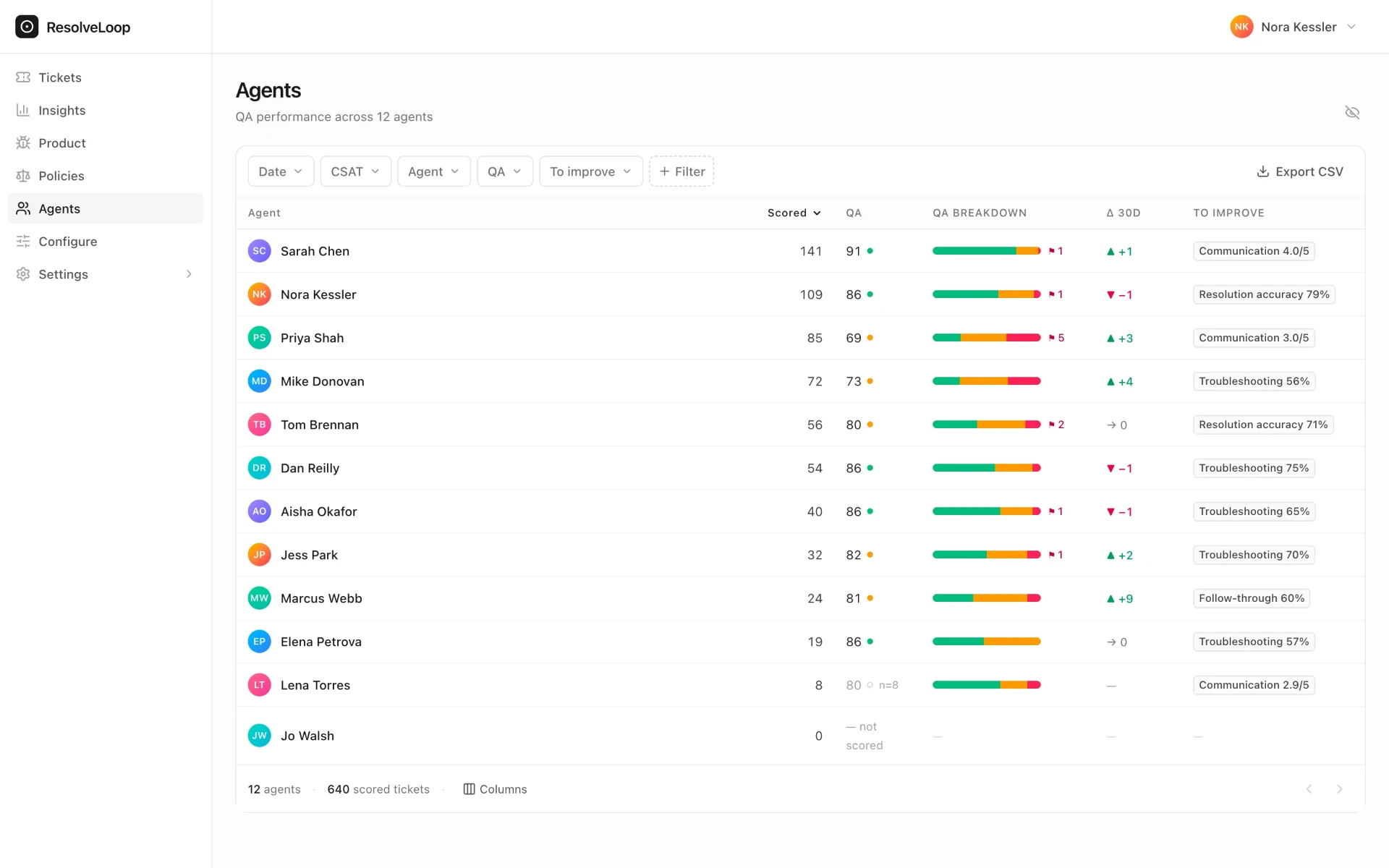
We said the handling side is a full QA programme. Here it is, item by item:
Your scorecard, not ours.
Define the criteria your team actually reviews — communication, resolution accuracy, troubleshooting, documentation, follow-through — or start from ours and edit. It reads like your rubric because it is.
100% coverage, automatically.
Every closed conversation gets the full review. The two-tickets-per-agent spot check on a Friday afternoon becomes the exception you dig into, not the whole programme.
A coaching view per agent.
Results roll up by agent and by criterion, with the trend against the team — so “needs coaching” comes with a name for what to coach on.
Fair by construction.
Criteria that didn't apply drop out instead of counting against the agent, so a missing feature can't drag down someone who handled it well. Your team will trust the number — which is the point of having one.
Judged against your reality.
Every review is made against your live documentation and policies, not against what a frozen rubric assumed at setup.
None of this should surprise a QA lead — that's the point. The difference is the engine underneath: it knows your product, your policies, and what the customer was actually asking for.
The Customer Side
It names what customers keep hitting, and ranks it by what it costs you.
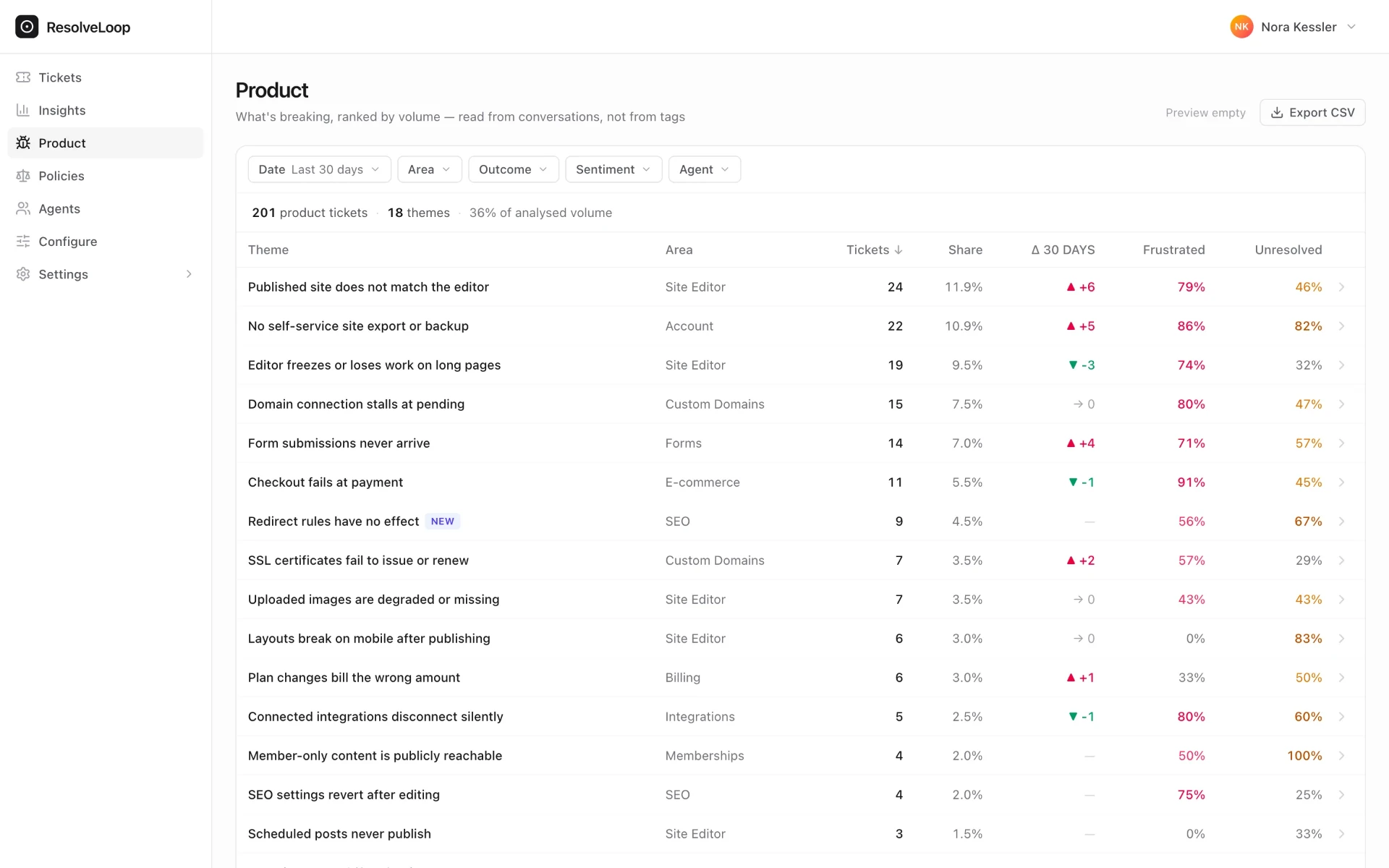
The other half — the one that never made the scorecard — gets the same rigour. The same read that reviews the handling also names the recurring problem behind each ticket: not a topic like "billing," but a theme — a specific failure such as Published site does not match the editor or No self-service site export or backup.
Read from what customers wrote, not from what agents tagged. Nobody trusts their tagging — the taxonomy is stale and the same three tags cover everything. ResolveLoop reads the conversation instead, grounded in your own documentation and policies, so it can tell a missing feature from a misunderstood one. Here too, it knows your business.
"We have agents tagging what the ticket was about, and that's a bit of a fool's errand — we measure them on productivity, so they don't put much thought into it. If the menu has 20 tags, the first four will always be the top four."
Nobody sets it up. Themes are discovered from your own tickets, and new ones appear as new kinds of problems appear — flagged, so an emerging issue shows up as an emerging issue.
Each theme carries its volume, its trend, how those conversations end, how frustrated customers are — and the conversations themselves, one click away. A roadmap item with the evidence attached, from tickets nobody had to tag. Send it to your product manager as it is.
The Product
What one read looks like on a real ticket.
Did the customer actually get what they needed?
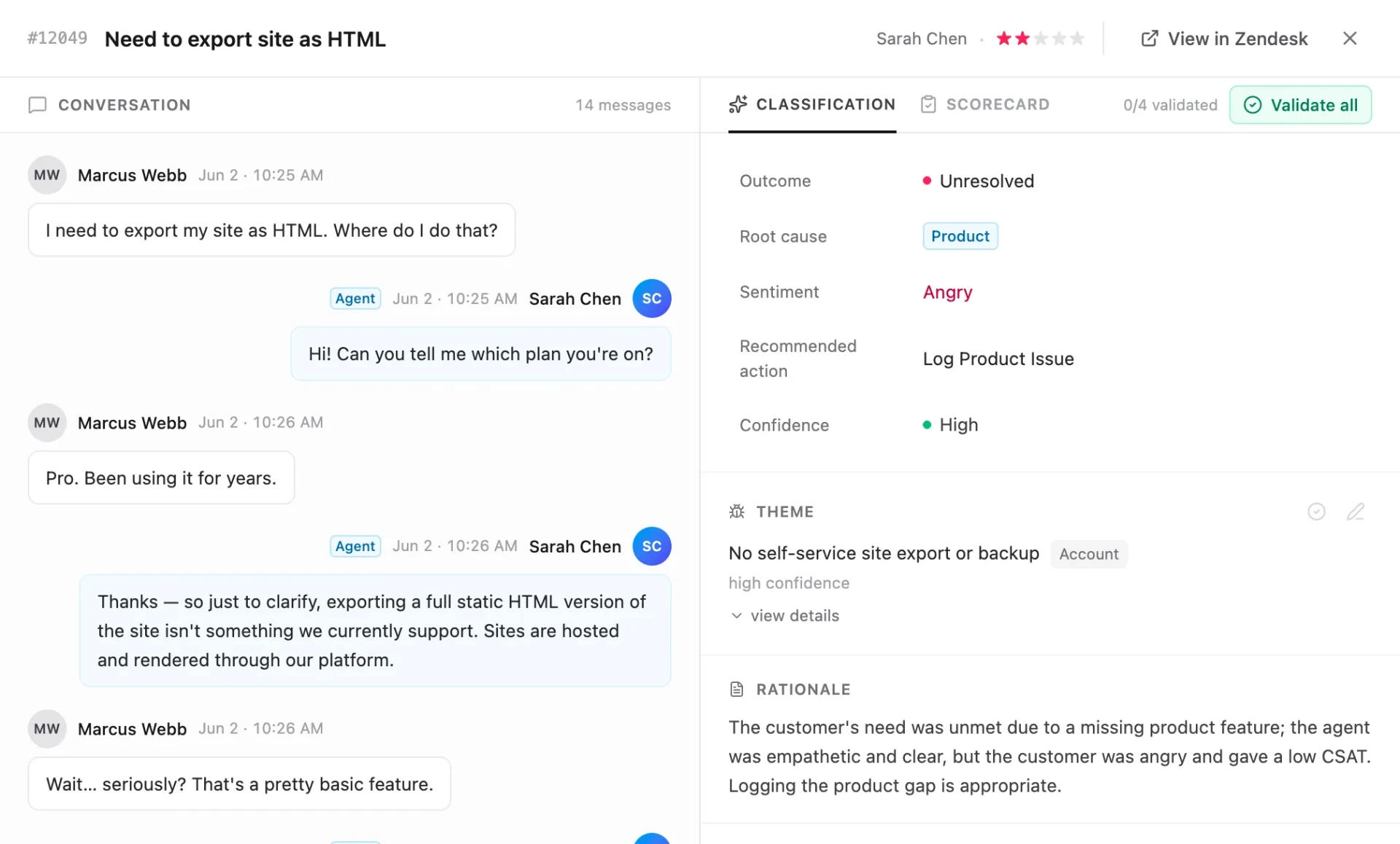
Marked solved doesn't mean resolved, and no survey doesn't mean happy. Every closed ticket gets a verdict: truly fixed, partly fixed, or left unresolved — and when it wasn't resolved, what got in the way and what to do next, with the reasoning written down.
And which recurring problem it belongs to
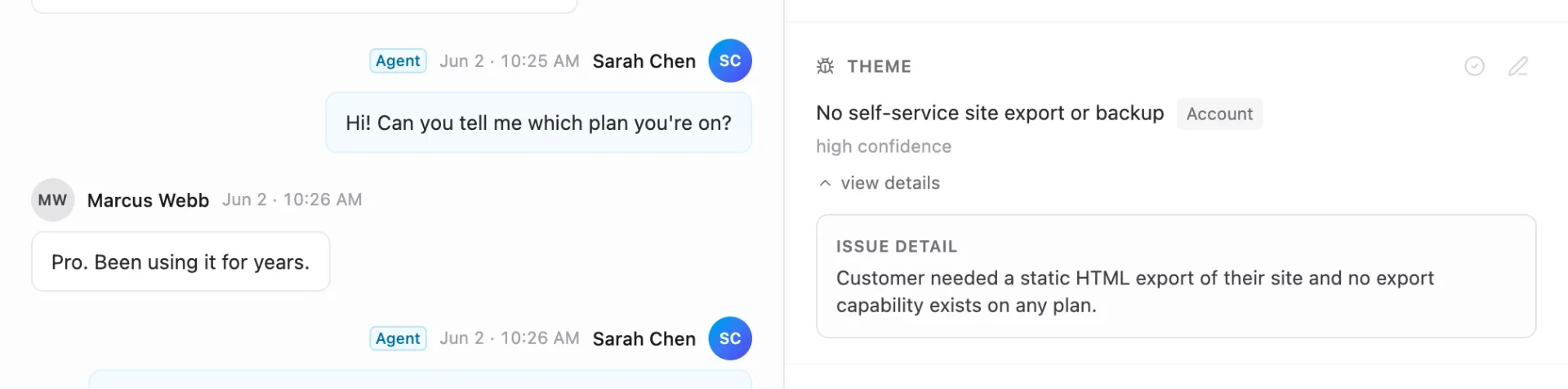
This ticket isn't a one-off complaint about exports — it's the 22nd instance of No self-service site export or backup. You can see the exact statement the analyzer wrote and grouped on, so the line from one conversation to the ranked list is never a black box.
It knows your product and your policies
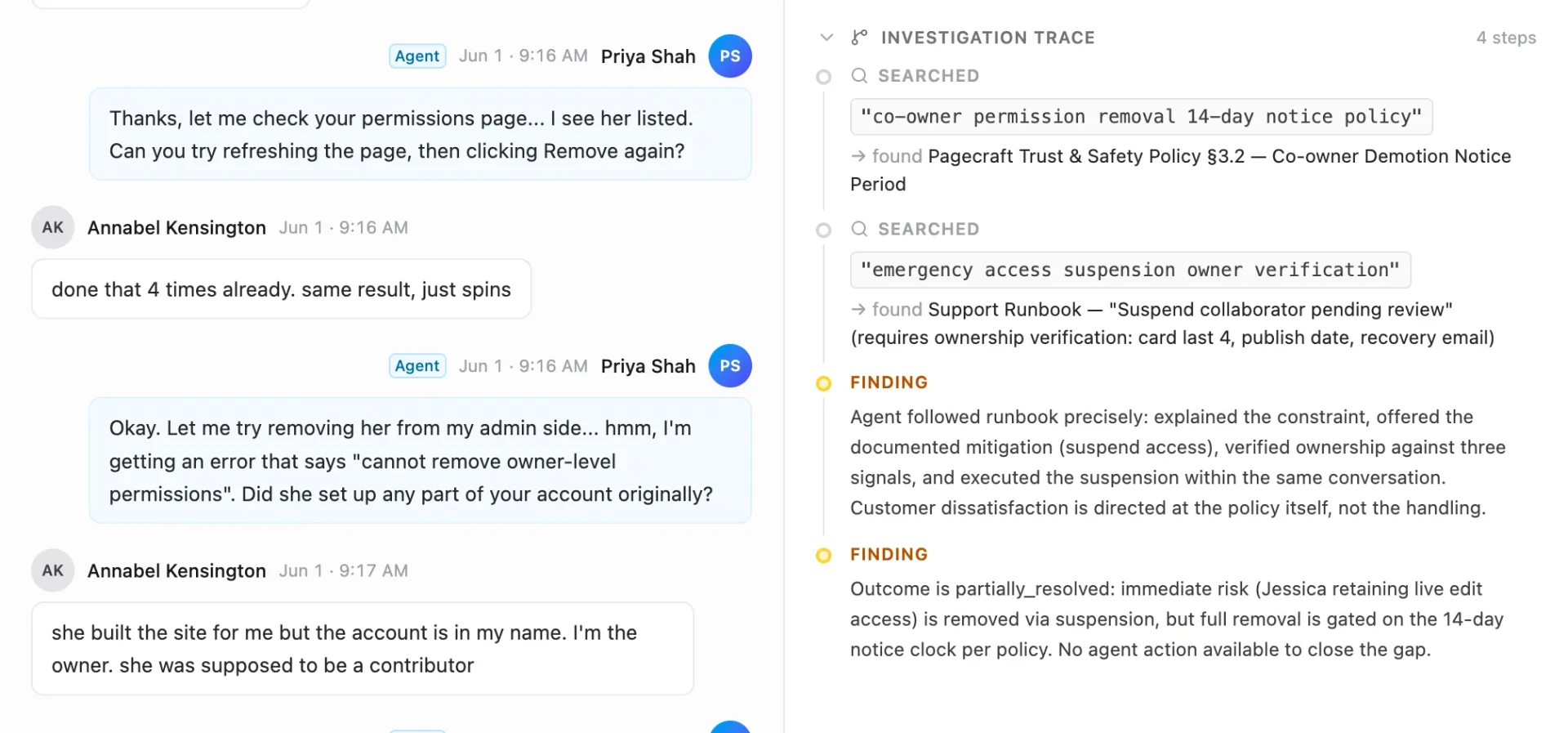
Before judging a ticket, ResolveLoop looks up the relevant part of your documentation and policies — and shows you what it found. It names the specific policy or article behind each verdict, so you can check the call yourself and defend it in a review instead of arguing with a black box. When a policy changes, you update the document, not the tool.
A read on every ticket, even the ones nobody rated
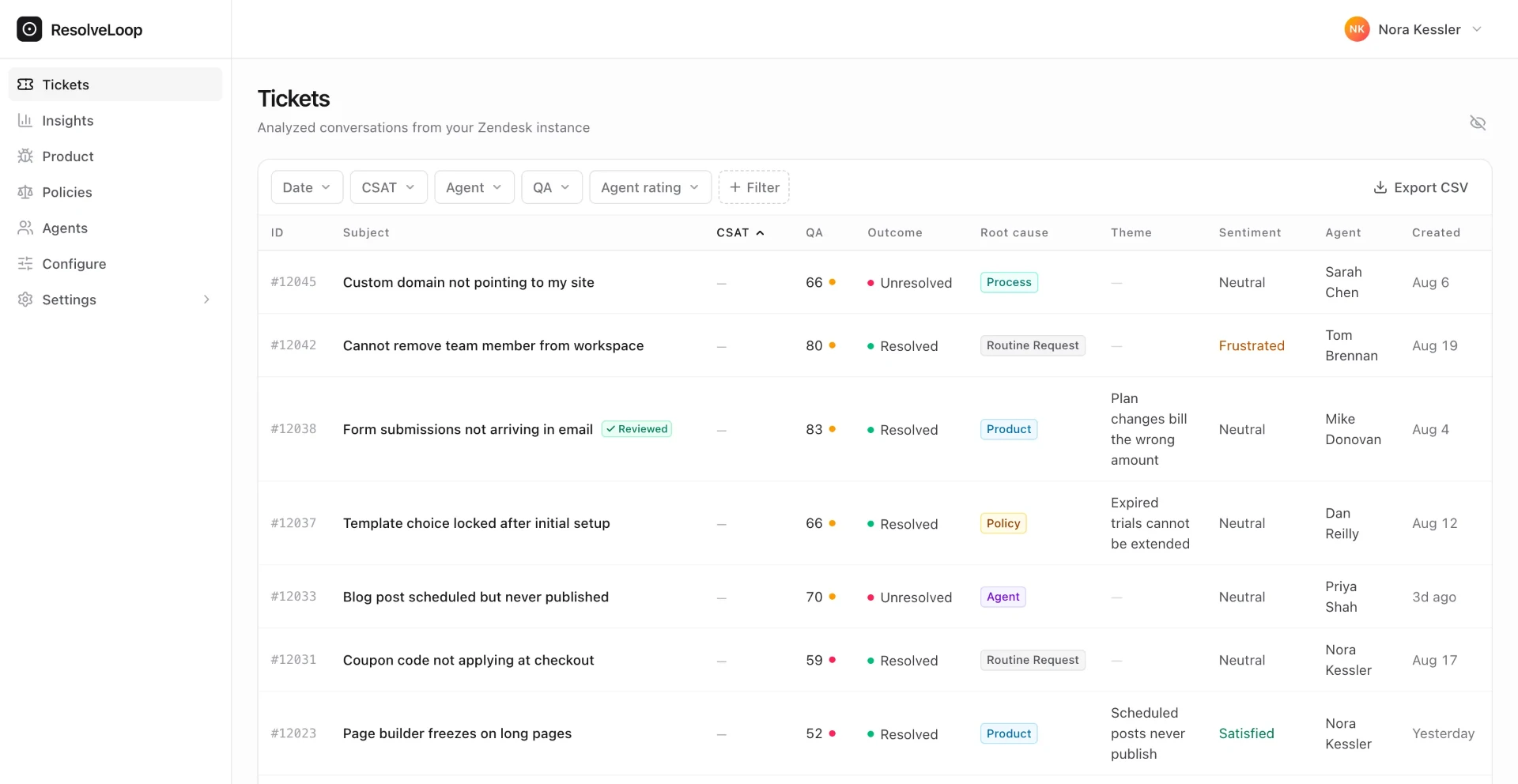
Surveys come back on a small slice of your tickets. ResolveLoop gives you the same read on the rest — the silent majority nobody rated — so “what's going wrong” is answered from everything that happened, not from the customers who felt like filling in a form.
Fair to your agents
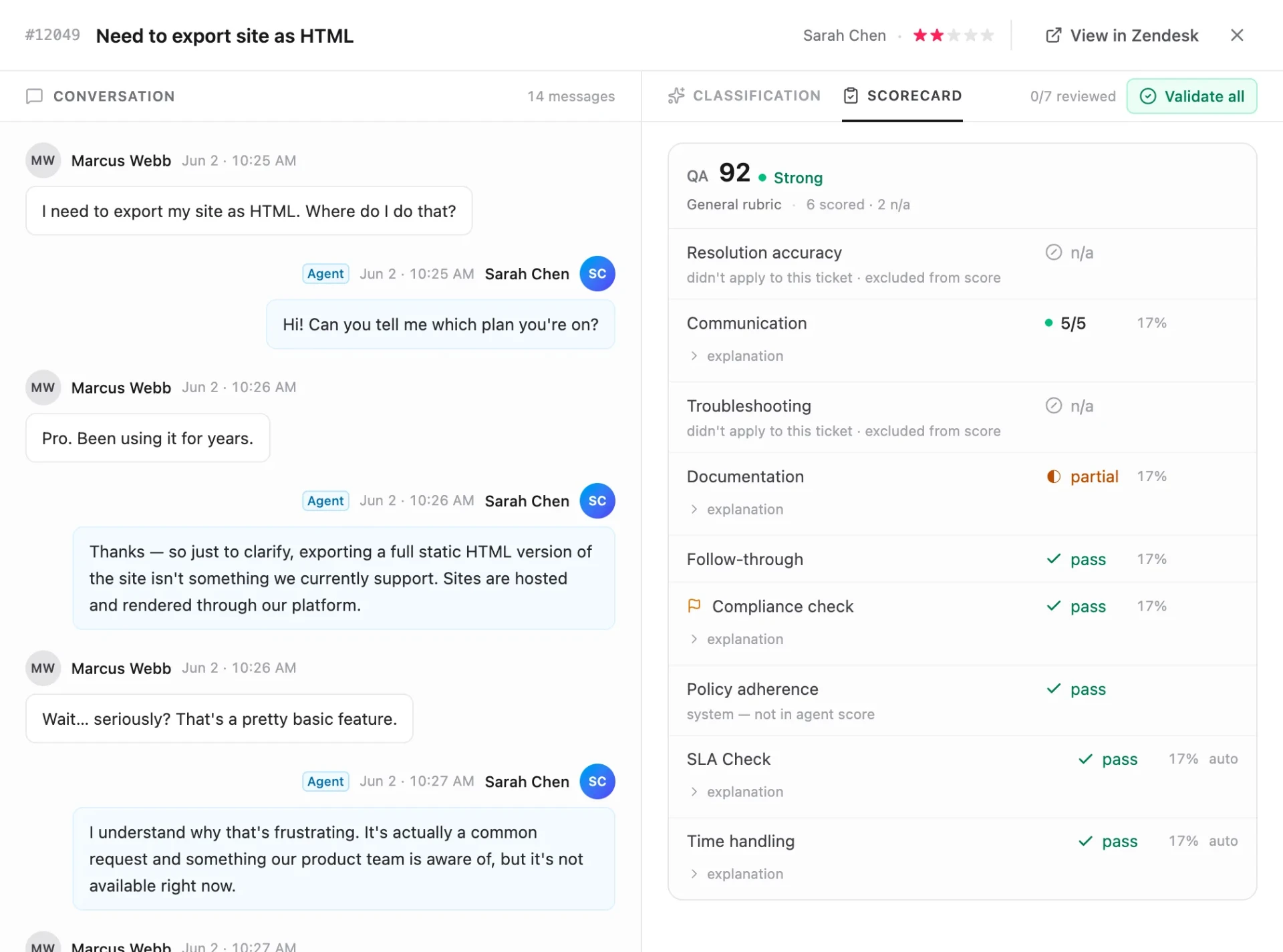
Here's a ticket that ended badly through no fault of the agent — and the QA result says so. Handling is judged on what the agent could control; criteria that didn't apply are excluded, not failed. A bad outcome and a strong review on the same ticket, with the breakdown showing exactly why both are true.
It keeps learning from your team
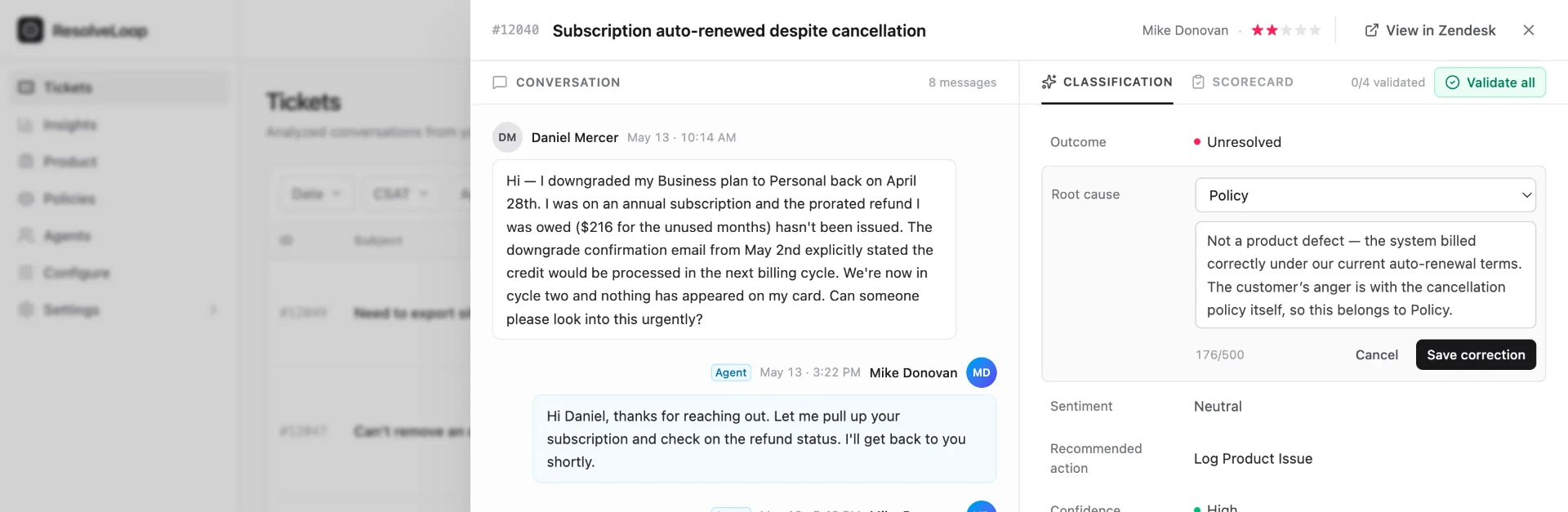
Every judgment is correctable in place — the verdict, the cause, the theme, any criterion. When a reviewer changes one and says why, that becomes ground truth, so ResolveLoop reads tickets more like your team does with every correction.
The Part Nothing Else Does
Your QA tool asks whether the agent followed the policy. We also ask whether the policy is worth following.
Point the same analysis at your own rules instead of your software and you get the report no one in this market produces: your policies, by name, ranked by what they cost you.
Annual plans fall outside the refund window. Cancellation only takes effect at period end. Collaborator access can't be revoked immediately. Each one with the volume behind it, the trend, and how the customers who hit it actually felt.
Watch what the numbers do on a policy theme. Volume up. Mostly resolved. Overwhelmingly frustrated. Your agents are handling these well, the workaround works, and customers are still angry — because the objection is to the rule, not to the handling. No amount of coaching moves that number. Until now it didn't look like a defect and it didn't look like a bad agent, so it never looked like anything at all. It just looked like support volume.
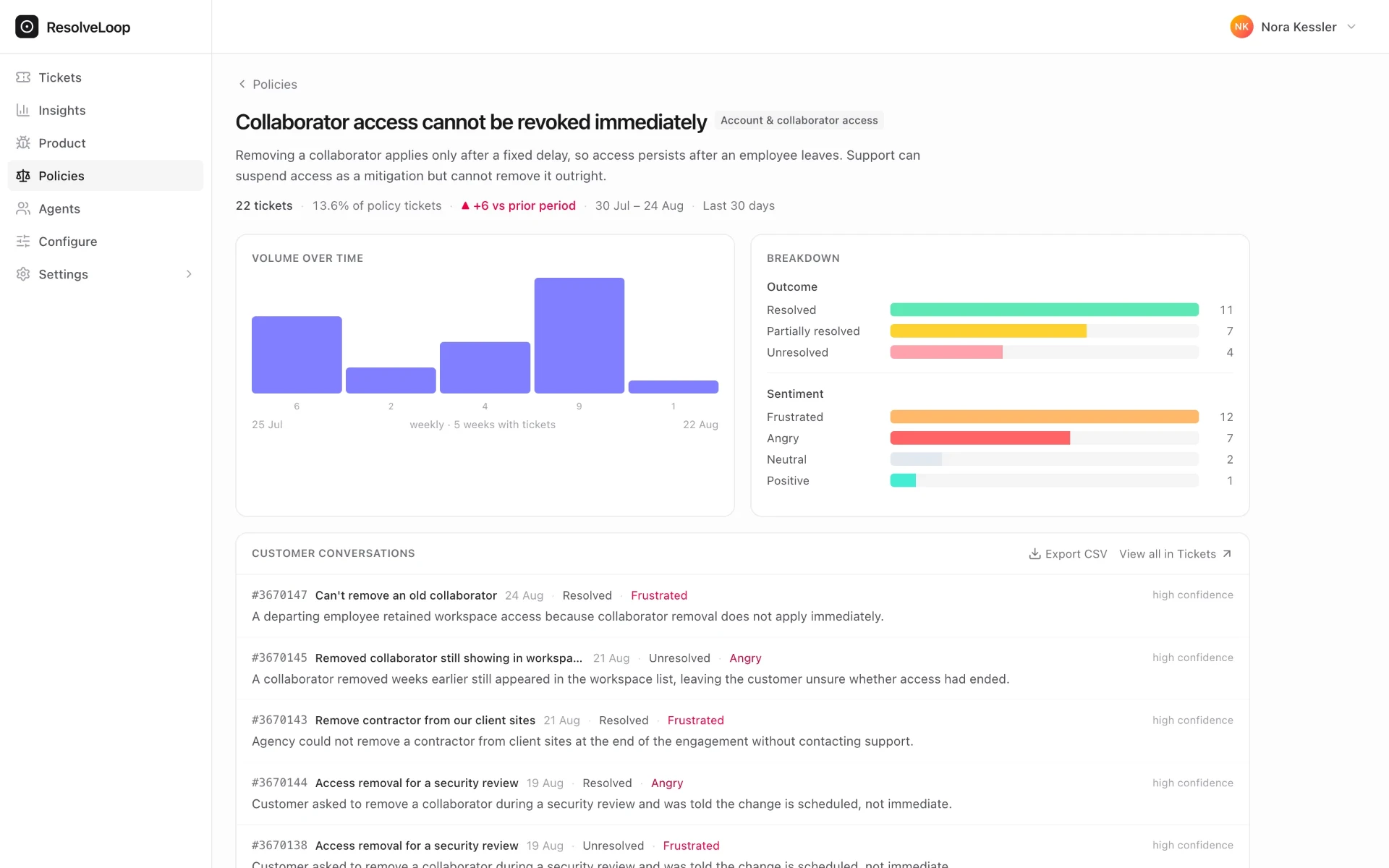
That's a decision for the business, and it's the first time anyone has put it in front of you with a number on it.
The Connection
Coach the agent, fix the policy, or both — now you can tell.
Take any pain driver: refunds, shipping, billing. A QA tool tells you how the agent performed. A VoC tool tells you customers are unhappy about it. Neither tells you what to do.
Because the agent's handling and the cause come from the same read, you can put them side by side on the same driver. The team is doing well but outcomes are still bad: the fix is upstream — a policy or a process. Both weak: you're dropping the ball in two places. Now you know whether to coach, to change the policy, or both, instead of guessing.
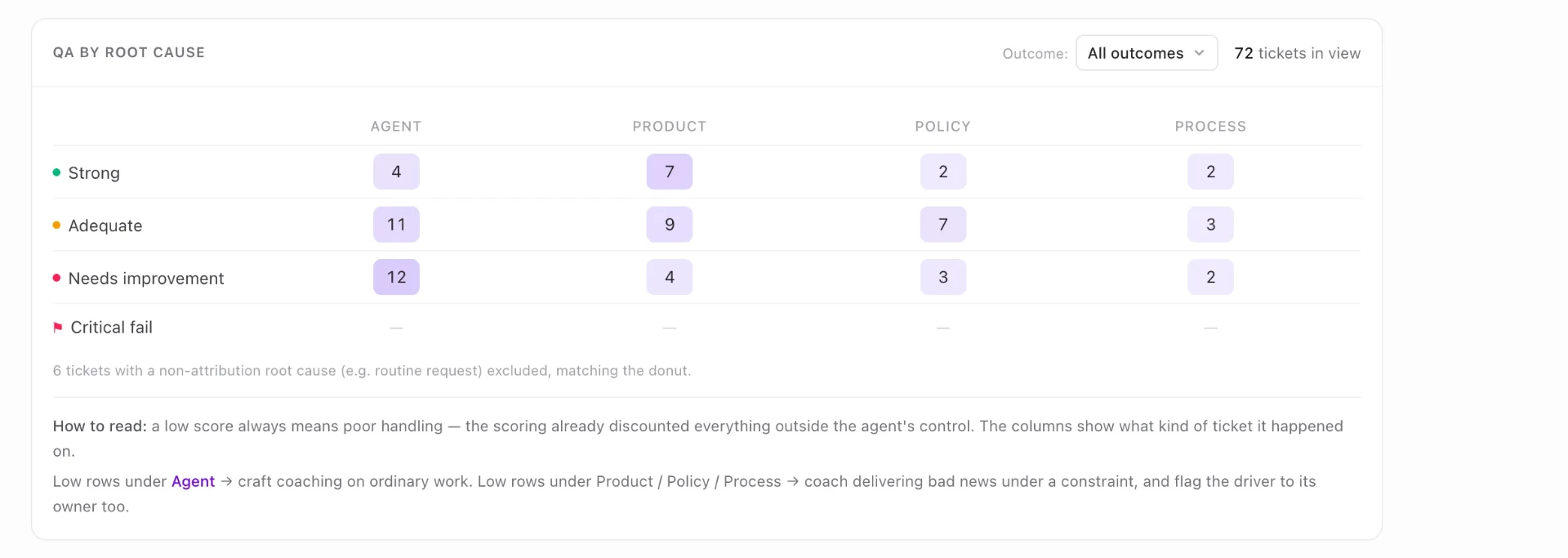
It works per agent too. Open anyone on the team and their weak tickets split by cause — the ones that were genuinely about how they handled it, and the ones where they were delivering bad news under a constraint nobody's fixed. Those are two different conversations, and most QA tools force you to have the wrong one.
What You Get
What you get on every closed ticket
Outcome verification
Was the issue actually resolved? Independent of whether the ticket was marked "solved."
The root cause
Agent, product, policy, or process, with a confidence level and the reasoning behind it.
The actual problem, named
Not just "the product," but which recurring failure. Not just "a policy," but which rule. Grouped automatically across every ticket that hit it.
A QA score on every ticket
Reviewed against your own scorecard, on what the agent could control.
Per-agent performance
QA results rolled up by agent and by criterion, with the trend over time and each agent's weakest criterion surfaced.
Customer sentiment, start to finish
Including the recovery cases: customer arrives furious, agent handles it brilliantly, customer leaves satisfied.
Three different questions, three different numbers, one read: how the agent handled it, how the customer felt, and whether it actually got solved.
One Analysis Where Today There Are Three
Three vendors, three data models, three logins, three partial answers.
Before
QA tool
How the agent performed
VoC tool
What the customer talked about
CSAT tool
Whether they were satisfied
Three vendors · three data models · three logins
ResolveLoop
Team
how it was handled
Product
what's breaking
Policies
where your own rules are costing you
The same conversation read for all of it, so the answers line up against each other.
Built For You
Built for the work you're already doing manually
You already do this analysis. You read the bad tickets. You guess at the cause. You defend the agent in the 1-on-1. You make the case to leadership that this isn't an agent issue. You build the spreadsheet that explains why CSAT moved.
ResolveLoop gives you the instrument for that work, on every ticket, with the reasoning written down.
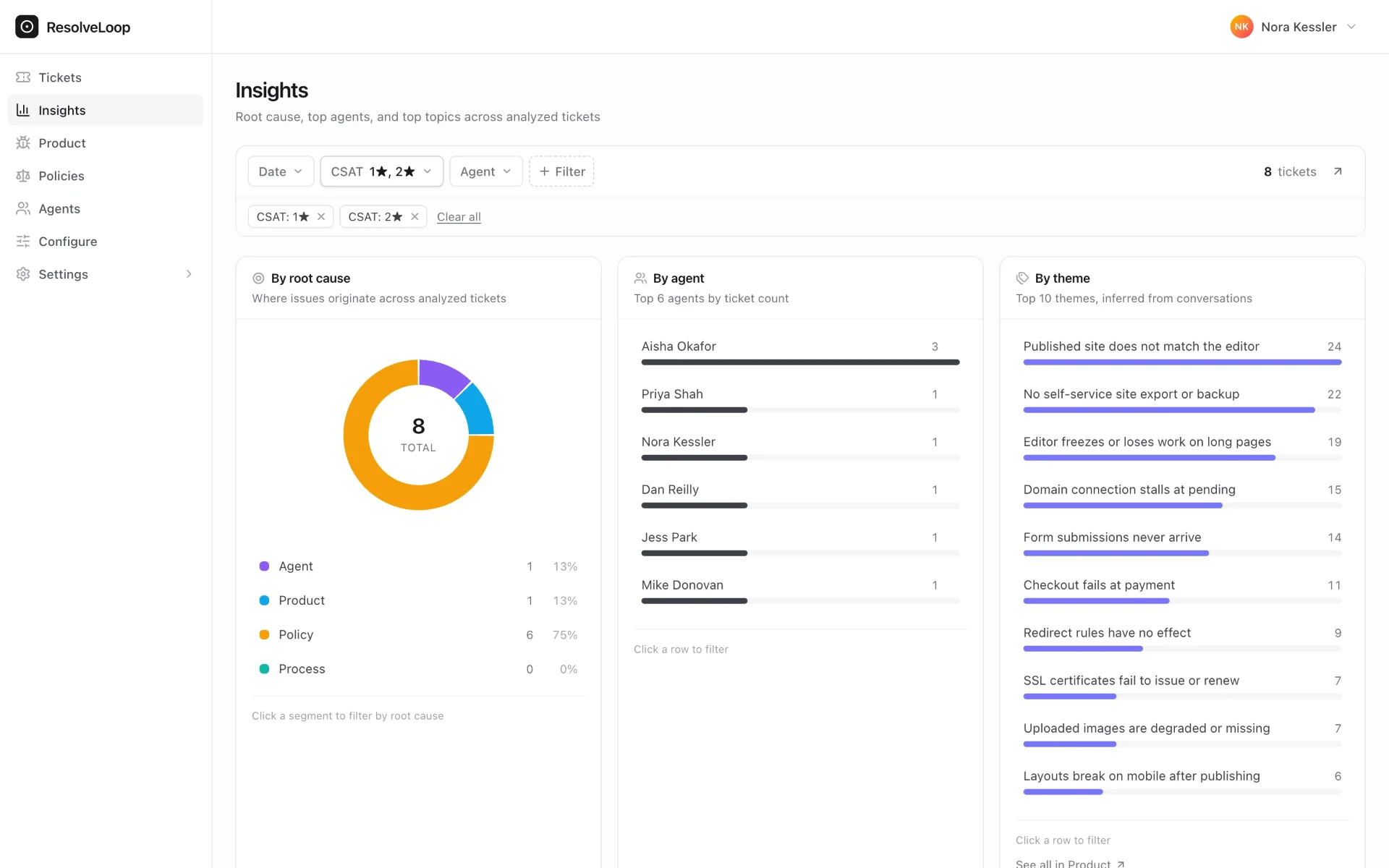
Agent fairness, defensible.
Stop calibrating coaching against numbers you don't trust. When the cause was outside the agent's control, the data says so — clearly enough to share in a 1-on-1 or take to leadership.
Defending support upward.
When ticket volume is being driven by a product bug or a broken policy, you have the theme, the volume, the trend, and the customers' own words. That's a case, not an anecdote.
Patterns you can't catch by reading.
When the same product gap is causing 30 bad outcomes across three teams, it's at the top of a ranked list, not buried in a queue you'd have to read.
Coverage on the tickets nobody rated.
With surveys, most teams hear back from fewer than 30% of customers. ResolveLoop reads the other 70%+ too, so you finally know what's happening across the whole population.
One place to work, and your AI assistant too.
Review everything in ResolveLoop, filter and drill into any ticket, and export what you need. Already running your own AI on tickets? Query the structured output through your assistant of choice (Claude, Gemini, and others via MCP). No data lake project.
How It Works
From closed ticket to answers, automatically.
Ticket closes.
Whether it's marked solved, the customer stopped responding, or it auto-closed, ResolveLoop reads it.
The whole conversation gets evaluated.
Not just what the agent said — the customer's intent, the handling against your scorecard, the outcome, and how the customer's mood evolved.
The verdict is grounded in your knowledge.
For each ticket, the analyzer looks up the relevant policy, SOP or documentation and checks the agent's claims against it before judging.
Recurring problems surface on their own.
Each ticket's plain statement of what went wrong is grouped with every other ticket that hit the same underlying problem — no tagging, no setup.
You review and act in ResolveLoop.
Outcome, cause, theme, QA score, per-agent performance, sentiment and recommended action, with the confidence and reasoning behind each — all in one view. Query it through your AI assistant via MCP for ad-hoc questions.
Step 3 is the only place something enters from outside the line — that's the differentiator.
Who This Is For
For teams who believe support should change the business, not just absorb its problems.
If you already know half your bad outcomes aren't your team's doing — and you're tired of not being able to prove it — this is for you.
What We're Not
Honest framing, so you know what to expect.
We're not a survey tool.
CSAT and other ratings are useful inputs to ResolveLoop. They are not the product.
We're not a topic tagger.
We do group your tickets — into failures, not subjects. “Billing” is a topic. Downgrade removes paid features immediately is a finding. One of those tells you what to do on Monday.
We're not a real-time agent-assist tool.
ResolveLoop works after the conversation closes. The point is to learn from what already happened.
We're not a generic LLM-on-your-tickets pipeline.
A lot of teams have tried that. The structure is the product: a verdict on every outcome, the cause and the problem behind it named, a scorecard judged against your live documentation, and the confidence and reasoning on every field. Without that structure, you get summaries instead of decisions.
SOC 2 Type 2 certified
Enterprise-grade security and data handling, audited annually.
Built by Swifteq
The team behind 15+ Zendesk apps, trusted by hundreds of support teams.
Your data stays yours
Enterprise-grade handling, no training on your data, full audit trail on every verdict.
See it on your own tickets.
Book a 30-minute walkthrough on your own Zendesk data. We'll analyze a sample of your closed tickets and show you how each one was handled, what caused the bad outcomes, and the product and policy problems behind them — by name. No pitch deck. No generic demo.